Art for a boardroom: what the video-conference camera actually sees
A boardroom painting has to satisfy two different viewers: the room, and the camera. A bold color field with real depth of tone reads clearly on video, while fine, closely-spaced detail tends to blur or shimmer once the call compresses it, and the crop usually shows only the section directly behind the seated head, not the whole canvas.
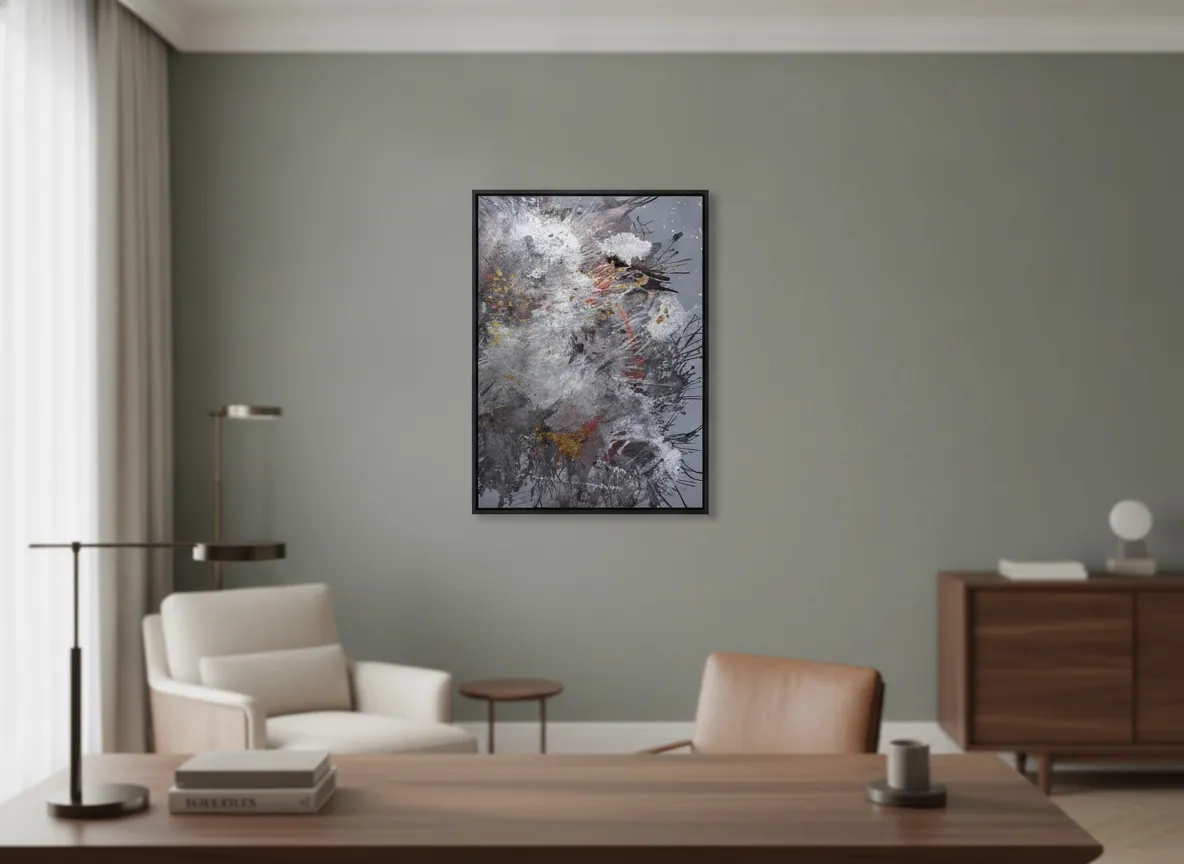
What the camera actually frames behind you
Anyone sitting at the table sees the whole wall, and can step back or lean in to take in a large painting in full. The camera never does that. In photography and film, headroom above a subject's head is framed proportionally to the shot, not as a fixed gap [1] — and a laptop webcam on a seated person, in the atelier's experience, tends to hold a similarly close frame: head, shoulders, and a little upper chest, with the wall visible only in a narrow band behind and just above the head.
The top edge of a tall canvas, or the far corners of a wide one, are often still fully visible to the room and completely outside the shot on everyone else's laptop. That's the detail worth checking before a piece goes up specifically for a wall that's on camera daily: not just what the room sees, but what a test call actually keeps in frame.
Why fine detail and repeating patterns struggle on a video call, and bold color fields don't
Two separate mechanisms work against a busy or finely detailed painting on screen, and they compound each other. The first is moiré: when a fine, closely and evenly spaced pattern in the subject — tight parallel brushwork, a dense grid of texture, a repeating weave — approaches the resolution limit of the camera's sensor, the two grids interfere and produce a shimmering band pattern that isn't in the painting at all. A solid color or a large, loosely spaced pattern has no comparable repeating structure to interfere with, so it doesn't trigger the effect [2].
The second is compression. A video call has a limited bitrate budget, and the encoder spends it on what changes and what's easy to keep — broad areas of flat or gradually shifting color survive largely intact, while fine texture is the first thing stripped out, leaving surfaces that should stay sharp looking soft or undefined [3]. A painting built from broad, high-contrast fields — deep tone against a lighter passage, a clear line of color change — comes through a video call close to how it looks in the room. One built from dense, evenly repeated fine texture is the one most likely to look different on-screen than it does in person.
Backlighting: the real enemy of the wall behind your chair
A window is a more common problem than a bad painting choice. Video-conferencing guidance is consistent on this: a bright window anywhere behind or beside the sitter degrades the shot, dimming the face and often leaving the wall behind it looking flat or washed out [4]. Either way, the painting stops doing the job it was hung to do.
The fix is almost never to change the art. It's to put the room's strongest light source in front of the sitter, or at a 45-degree angle to them, rather than behind — closing a blind, moving the desk, or adding a soft light aimed at the face solves the lighting problem for the person and, as a direct result, lets the painting keep its own color and contrast on screen instead of being lost against the window.
Scale and placement for a camera that never moves
A person walking into the room reads a wall from several distances and angles over the course of a meeting. A laptop or conference-room camera holds one fixed height and one fixed angle for the entire call, usually close to eye level for whoever is seated in the main seat. That single, unmoving viewpoint is what placement should be planned around, not just the furniture beneath it.
In practice, that means the part of the painting that matters most on video is whatever falls inside that head-and-shoulders band, not the piece's overall footprint on the wall. A large canvas hung too high relative to where the camera actually sits disappears above the frame; one hung too low gets cut off by the monitor, the back of a chair, or the edge of the desk. Orientation — vertical or horizontal — matters less than making sure the strongest passage of contrast in the piece lands in that zone.
Choosing one piece for a wall that's on-screen every day
Put the two factors together — a bold, high-contrast field for compression, good light rather than a backlit window — and the shortlist narrows fast. Origin of Light (60 × 80 cm, Heart of Chaos series, mixed media with acrylic and gold leaf on canvas, R$ 3,300) is a useful example of the type: broad passages of deep gray and white carry the composition, with scattered fragments of gold leaf and streaks of scarlet placed as accents rather than a repeating pattern — because they're dispersed rather than laid out in an evenly spaced grid, they don't create the kind of periodic structure a sensor reads as moiré.
None of this replaces looking at the actual result. A photograph of the wall in daylight says little about a specific webcam, a specific room's light, or a specific video platform's compression settings. Before committing a piece to a wall that will be on camera every working day, it's worth testing it on an actual call — not just standing in the room.
From the studio
Why I think about that wall as a stage, not a backdrop
I trained as an architect before I trained as a painter, and I still think about a wall the way I'd think about a section of a building under one fixed light source, not as free-standing decoration. A boardroom wall used to answer only to the people physically in the room, who could walk past it, catch it in changing daylight, or step closer to see the texture up close. A camera doesn't get any of that. It holds one framing, at one exposure, for the length of the entire meeting.
When I'm asked to place a piece on a wall like that, I spend less time thinking about the wall's full dimensions and more about the smaller rectangle the lens will actually keep — the space directly behind where a person sits, roughly at the height a laptop camera usually ends up. A painting built from broad fields of tone and real contrast still reads with weight inside that narrow rectangle. A painting that depends on being seen up close, in changing light, usually doesn't — and that's a very different test than the one most people apply when they're standing in the room choosing where to hang something.
Frequently asked
Does the video call camera show my whole painting, or just part of it?
Usually just part of it. A laptop webcam framing a seated person tends to hold a close shot — head, shoulders, and a little upper chest — so the band of wall that actually appears on screen sits close to head and shoulder height. A tall painting's top edge, or the far edges of a wide one, is often cropped out of that shot even though it's fully visible to anyone sitting in the room. Before hanging a piece specifically for the camera, it's worth checking what your actual video framing keeps in the shot.
Why does a detailed or textured painting look strange on Zoom or Teams?
Two separate things work against it. A fine, closely repeating pattern, such as tight brushwork or a dense grid of texture, can fall close to the resolution limit of the camera's sensor and produce moiré, a shimmering interference pattern that isn't in the real painting at all. Separately, video calls compress the image to fit limited bandwidth, and that compression smooths out fine detail before it touches broad areas of flat color. A bold color field with real tonal contrast survives both problems; dense fine texture usually doesn't.
Should I worry about a window behind my painting?
Yes, more than most people expect. A bright window anywhere near the wall behind you tends to pull a video call's exposure toward that light, washing out the wall, flattening the artwork's color, and often darkening your own face at the same time. The fix usually isn't to remove the painting; it's to control the light. Closing blinds, angling the desk, or adding a soft light source in front of the sitter keeps both the face and the artwork properly visible.
What size or orientation works best for art that's on camera daily?
Orientation matters less than what falls inside the actual camera crop. Because the visible band of wall sits roughly at head and shoulder height, a piece, whether vertical or horizontal, needs its strongest passage of color or contrast positioned in that zone rather than centered on the full canvas. For exact wall dimensions and pricing across formats, a guide to sizing art for a boardroom or reception wall is a better starting point than a general size rule.
Does gold leaf or metallic detail read well on a video call?
It depends on how it's used. Metallic accents scattered as occasional fragments against a broader dark or light field add a flicker of highlight without creating a repeating pattern, so they tend to hold up fine under compression. Metallic leaf applied as a tight, evenly repeated pattern across a large area is the riskier case, since that repetition is closer to the kind of fine periodic detail that produces moiré. When in doubt, ask to see how a specific piece actually looks on a recorded video call before deciding.
Can I just test how a painting looks on camera before buying it?
Yes, and it's the most reliable way to decide. A photo of a wall in daylight says little about compression, your specific webcam, or the light in your actual meeting room. Perfeito Studio can help think through placement and scale for the space in question before a piece ships, so the decision is based on how the room and the call both actually work, rather than on guesswork about camera behavior.
Want a second opinion on what your boardroom wall shows on camera?
Send a photo of the wall and, if you can, a screenshot of your usual video-call framing — the studio will help identify a piece that reads well on the call, not only in the room.
Sources
- Wikipedia — 2026-09-05
- Wikipedia — 2026-09-05
- Vmake AI (blog) — 2026-09-05
- Webex Blog (Cisco) — 2026-09-05
Published on